
Estimated reading time: 7 minutes
When people think about malware, they often picture suspicious email attachments or obviously dangerous downloads.
In reality, many infections now begin through everyday web browsing.
Checking the news, researching suppliers, downloading software, or searching Google can all expose devices to malicious websites, fake adverts, or hidden exploits if the right protections are not in place.
As IT support providers, we regularly help businesses recover from infections that started with a simple click or visit to a compromised website.
In this guide, we explain how web-based malware threats work, why they are so effective, and what practical steps businesses can take to reduce the risk.
How Malware Gets In Through Web-Based Threats
Modern web-based attacks are designed to look normal.
Attackers know that users are more cautious around suspicious emails than they used to be, so many threats now focus on exploiting trust in websites, search engines, and online tools.
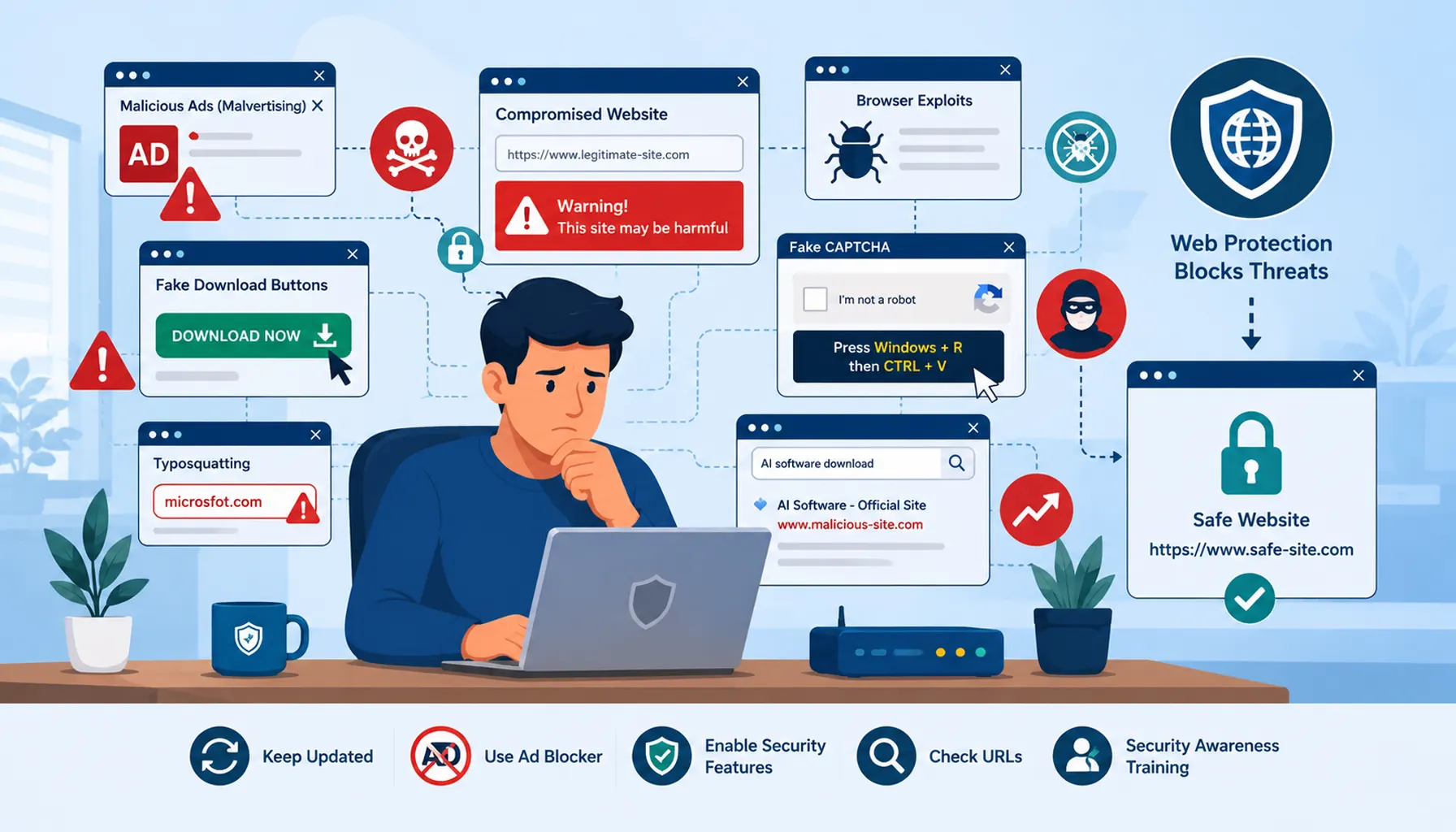
Malicious Ads and Malvertising
Even legitimate websites can unknowingly display malicious adverts.
This is known as malvertising. Attackers place harmful adverts through advertising networks, and those adverts can redirect users to malicious websites or trigger unwanted downloads.
Because the advert appears on a trusted website, users often assume it is safe.
Major organisations including the BBC and Spotify have previously been affected by malicious advertising campaigns, proving that even reputable websites can be exposed.
Fake Download Buttons and Software Sites
Some websites imitate legitimate download pages while disguising malware as software installers.
These attacks are particularly common on free software, streaming, or file conversion websites where users are encouraged to click large “Download Now” buttons.
In many cases, multiple fake buttons are deliberately placed around the real download link to increase the chances of accidental clicks.
Historically, websites such as SourceForge became known for misleading download experiences involving bundled or unwanted software.
Compromised Legitimate Websites
Attackers do not always create fake websites from scratch.
In many cases, they compromise genuine websites and inject malicious code into them. A perfectly normal site can therefore become dangerous without the owner immediately realising.
WordPress websites are frequently targeted because of outdated plugins, weak passwords, or poor maintenance practices.
Simply visiting an infected page can sometimes expose users to malicious scripts or hidden redirects.
Browser and Plugin Exploits
Outdated browsers and plugins are a major security risk.
Attackers actively look for vulnerabilities in browsers, PDF readers, media players, and extensions that can be exploited silently in the background.
Older technologies such as Flash and QuickTime became well known for serious vulnerabilities after support was abandoned.
In some cases, users do not even need to click anything for an exploit to run. Simply loading the page can be enough.
Fake CAPTCHA and Verification Scams
Some malicious websites now use fake CAPTCHA checks to trick users into infecting their own systems.
These prompts often appear convincing and claim the user must complete a verification step before accessing content.
A growing tactic involves instructing users to copy and paste commands into Windows Run prompts or PowerShell windows.
Because the instructions appear to come from a “security verification”, many users follow them without realising they are executing malicious commands.
SEO Poisoning and Malicious Search Results
Not every top Google result is safe.
Cybercriminals use a technique known as SEO poisoning to push malicious websites higher in search rankings for popular searches.
Recent campaigns have targeted AI software, remote access tools, and popular business applications by creating fake websites designed to look genuine.
Users searching for tools such as ChatGPT or common productivity software may unknowingly click on a malicious version before search engines remove it.
Google and Microsoft respond quickly to many campaigns, but attackers constantly create new domains and variations.
Typosquatting and Lookalike Domains
Sometimes the danger comes from a simple typing mistake.
Attackers register domains that closely resemble genuine websites in the hope that users will accidentally visit them.
For example:
- microsfot.com
- paypa1.com
- goggle-support.com
These websites are designed to steal passwords, distribute malware, or trick users into entering sensitive information.
How to Reduce the Risk of Web-Based Malware
Reducing web-based malware risk is about combining safer browsing habits with the right technical controls.
No single tool will stop every threat, but layered protection makes it much harder for attackers to succeed.
Keep Browsers and Systems Updated
Modern browsers release security patches frequently.
Ensuring updates are installed quickly helps close vulnerabilities before attackers can exploit them.
Outdated plugins and extensions should also be removed, especially unsupported technologies such as Flash or legacy media plugins.
Be Cautious With Downloads and Pop-Ups
If something looks aggressive, misleading, or too good to be true, it usually deserves caution.
Users should avoid clicking unexpected pop-ups, fake download buttons, or urgent warning messages that pressure them into taking action immediately.
Legitimate software should always be downloaded directly from trusted vendor websites.
Use Ad Blocking and Web Protection
Modern ad blockers can significantly reduce exposure to malicious advertising.
Many security platforms also include web filtering and reputation checking, blocking dangerous sites before they load.
This adds another important layer of protection for businesses.
Enable Browser Security Features
Most modern browsers include built-in protection against phishing sites, malicious downloads, and dangerous connections.
These protections should remain enabled across all business devices.
Double Check Website Addresses
Users should always verify the spelling of important website addresses before logging in or downloading files.
Even small differences in spelling can indicate a fake website.
Bookmarking trusted sites can also help reduce the risk of accidental visits to lookalike domains.
Invest in Security Awareness Training
Technology alone is not enough.
Helping staff recognise suspicious websites, fake prompts, and misleading search results remains one of the most effective ways to reduce risk.
Security awareness training creates confidence and encourages users to pause before clicking.
Frequently Asked Questions
Can visiting a website really infect a computer?
Yes. Some malicious websites exploit browser vulnerabilities or trick users into downloading malware through fake prompts, adverts, or downloads.
Are Google search results always safe?
No. Attackers sometimes use SEO poisoning to push malicious websites higher in search results for popular searches.
What is malvertising?
Malvertising is the use of malicious adverts on websites to redirect users, spread malware, or trigger harmful downloads.
How can businesses reduce web-based malware risks?
Keeping systems updated, using web protection tools, enabling browser security features, and training staff all help reduce risk significantly.
Are small businesses targeted by web-based attacks?
Yes. Many attacks are automated and target any vulnerable user or business regardless of size.
Taking a Proactive Approach to Web Security
At Telanova, we help businesses across Wokingham, Ascot, Bracknell, Reading and the wider Berkshire region stay protected against evolving online threats.
That includes helping businesses secure browsers, manage updates, improve web protection, and educate teams about the risks that exist during everyday browsing.
If you would like a clearer picture of how your systems are protected, or where improvements could be made, we are always happy to provide practical, straightforward advice.
Explore our IT support services or call 01344 989 530 to speak with our team.