
Estimated reading time: 9 minutes
The cloud has become one of the most commonly used terms in business IT, but also one of the least clearly explained.
As an IT support provider, one of the questions we regularly hear is: "Everything is in the cloud now... right?"
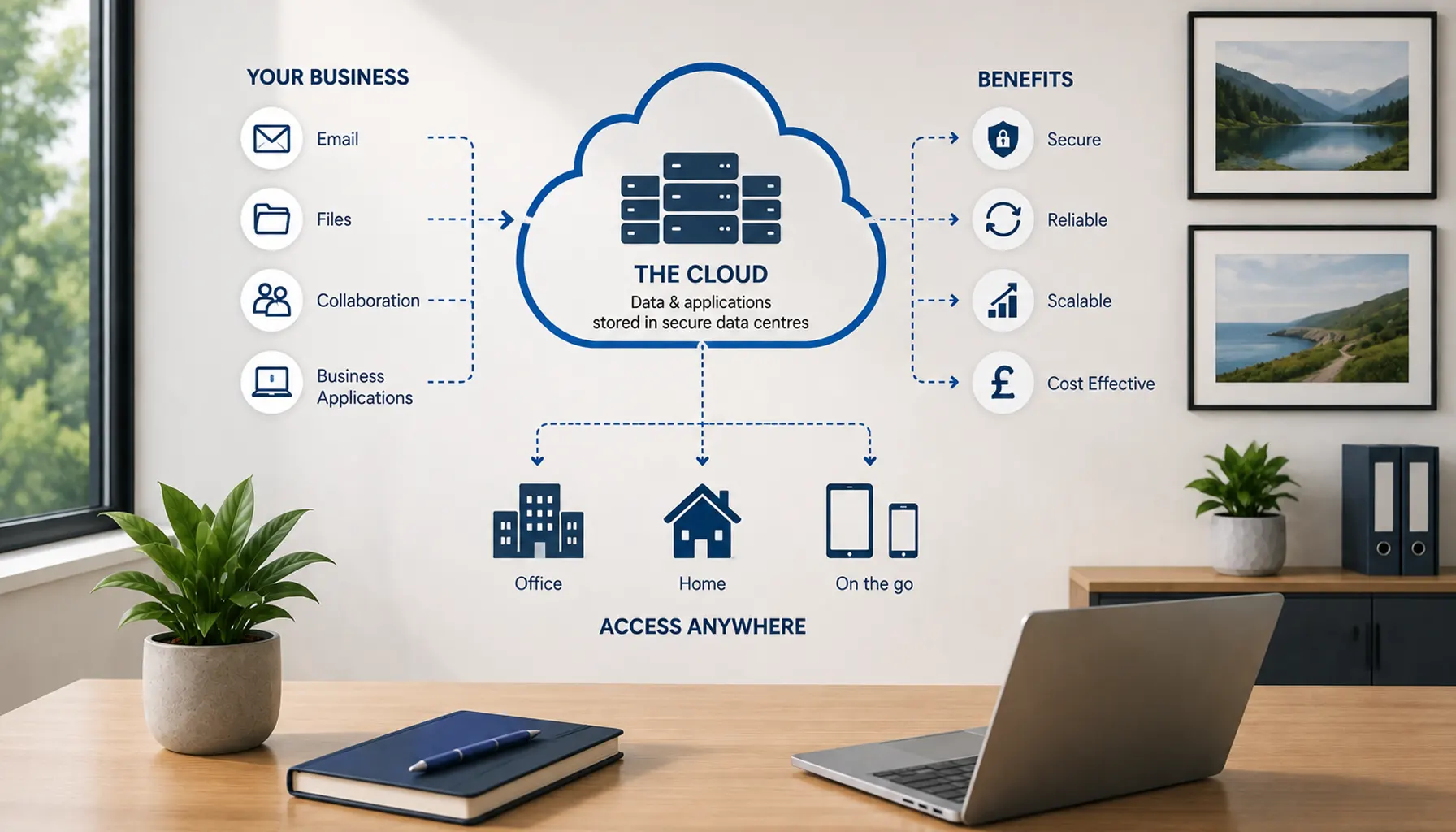
The answer is partly yes, but the reality is more nuanced. Most businesses already use several cloud services every day, often without really thinking about them as "the cloud". Email, file storage, accounting software, CRM systems, collaboration tools and specialist business applications may all be delivered from remote data centres rather than equipment sitting inside your office.
For small and medium-sized businesses, cloud technology isn't really about following an IT trend. It is about choosing where your systems and data should live so they remain secure, reliable and practical for the way your team works.
So, what does "the cloud" actually mean, and does everything really need to move there?
What Is the Cloud, Really?
At its simplest, cloud computing means that data, applications or computing resources are hosted on remote infrastructure rather than relying entirely on a computer or physical server inside your own premises.
Those systems run from data centres operated by organisations such as Microsoft, Amazon and Google, along with many specialist software and hosting providers. Your employees access the services over the internet rather than needing to be physically connected to the server itself.
It is very similar to the difference between owning a DVD and using a streaming service. With the DVD, the content physically sits with you. With streaming, somebody else operates the infrastructure and delivers the content to you whenever you need it.
Business cloud services work on a similar principle, although the technology behind them is considerably more sophisticated.
You're Probably Already Using the Cloud
Many businesses think of "moving to the cloud" as a future IT project when, in reality, they are already heavily dependent on cloud services.
If your email is hosted in Microsoft 365, documents are stored in SharePoint or OneDrive, your accounting package is accessed through a browser, or your CRM can be opened from anywhere with an internet connection, you are already using cloud technology.
Even everyday activities such as checking business email on a mobile phone or joining a Microsoft Teams meeting normally rely on cloud infrastructure behind the scenes.
This is why the cloud shouldn't be thought of as one product or one destination. A business may use several completely different cloud platforms at the same time, each providing a different service.
What the Cloud Is Not
The word "cloud" can make the technology sound more mysterious than it really is.
Your information isn't floating around somewhere with no physical location. Ultimately, it still exists on physical servers, storage systems and networking equipment. The difference is that this infrastructure is located in professionally operated data centres rather than necessarily sitting inside your office.
The cloud also isn't automatically less secure than having a server on your own premises, and it isn't something designed only for large enterprises.
Small businesses now use cloud platforms every day because they provide access to technology and infrastructure that would often be impractical to build and maintain internally.
At the same time, moving something into the cloud does not automatically make it secure or remove the need for good IT management. How the service is configured, who can access it and how users and devices are protected still matter.
Why Do Businesses Move to the Cloud?
Most businesses don't adopt cloud technology because somebody has told them it is fashionable. They move particular systems because there is a practical reason to do so.
One of the biggest advantages is accessibility. A cloud-based application can usually be accessed from different locations without requiring an employee to sit beside a server in the office. This can make remote and hybrid working considerably easier.
Cloud platforms can also reduce the business's dependence on a single physical server. Reputable cloud services may use multiple systems, data centres and layers of resilience to help maintain availability when individual components fail.
Scalability is another benefit. Adding users, storage or additional services can often be achieved without purchasing and installing more physical hardware.
Cloud subscriptions can also change the way businesses pay for technology. Instead of making a large investment in hardware every few years, many services are charged monthly or annually according to the licences or resources being used.
That can make costs easier to plan, although cloud services are not automatically cheaper. Licensing, storage, backup and usage charges still need to be understood properly.
Is the Cloud More Secure Than an Office Server?
There isn't a simple answer because security depends on both the platform and how it is configured.
Large cloud providers invest heavily in physical security, monitoring, infrastructure resilience and security expertise. It would be difficult for most small businesses to replicate that level of underlying infrastructure protection in their own server room.
However, that doesn't mean the business can simply move data into a cloud platform and assume everything is protected.
Your organisation remains responsible for many important areas, including user accounts, permissions, multi-factor authentication, administrator access, device security and how employees handle company information.
If somebody gains access to an employee's Microsoft 365 account because MFA hasn't been enabled, the fact that Microsoft's infrastructure is secure doesn't prevent the compromised account from being used.
The same principle applies to badly configured permissions, unmanaged devices and former employees whose accounts were never removed.
If you're unsure how well these protections are configured across your business, our guide to checking whether your business IT systems are secure covers the key areas worth reviewing.
Is Cloud Storage the Same as a Backup?
This is an important distinction because cloud storage and backup are often treated as though they mean the same thing.
They don't necessarily.
Cloud platforms usually provide their own levels of resilience, retention and recovery, but that doesn't automatically mean those capabilities match your organisation's backup and recovery requirements.
For example, consider what would happen if an employee accidentally deleted an important folder, files became corrupted, a compromised account removed information, or ransomware affected files synchronised between a laptop and cloud storage.
The key question isn't simply "Is our data in the cloud?" It is "If something goes wrong, can we recover the information we need within an acceptable timeframe?"
That is why backup planning should consider what information exists across Microsoft 365, cloud applications, local devices and any remaining on-premises systems.
Our guide to building a disaster recovery plan for a small business explains how backups and recovery fit into wider business continuity planning.
Cloud Doesn't Mean Everything Has to Move
One of the biggest misconceptions around cloud adoption is that a business needs to choose between being completely cloud-based or completely on-premises.
In reality, many businesses operate somewhere in between.
Your organisation might use Microsoft 365 for email and collaboration, a cloud-based accounting package, and online backup services while still running a specialist application or file server inside the office.
There is nothing inherently wrong with that arrangement if each system is there for a sensible reason.
The objective should be to decide where each workload works best rather than moving everything simply because cloud technology is available.
Cloud, On-Premises or Hybrid: What's the Difference?
An on-premises system normally means the hardware and software are operated from equipment located within your own premises or another location directly controlled by the business.
A cloud-based system is hosted remotely and accessed through the internet. The service provider manages some or all of the underlying infrastructure on your behalf.
A hybrid environment combines the two.
Hybrid arrangements are common in established SMEs because technology doesn't normally change overnight. A business may have newer cloud applications sitting alongside software that has been used successfully for many years and still depends on a local server.
Over time, some of those older systems may move to a cloud platform, while others may remain where they are because that remains the most appropriate solution.
The important thing is that these systems work together securely and reliably rather than creating unnecessary complexity.
SaaS, PaaS and IaaS in Plain English
Cloud computing is often divided into categories such as SaaS, PaaS and IaaS. These terms sound technical, but the basic ideas are straightforward.
Software as a Service (SaaS) is the type most small businesses encounter every day. You use a finished application that somebody else hosts and maintains. Microsoft 365, Salesforce and many modern accounting, CRM and project-management platforms work this way.
Platform as a Service (PaaS) provides developers with an environment in which they can build, run and manage applications without having to manage all of the underlying server infrastructure themselves.
Infrastructure as a Service (IaaS) allows organisations to rent computing resources such as virtual servers, networking and storage rather than purchasing the physical equipment themselves.
For most SMEs, SaaS is by far the most visible part of cloud computing. Your business may use IaaS or PaaS behind the scenes, but employees generally just see the application they need to do their job.
Should We Move Our Existing Server to the Cloud?
This is where cloud discussions become particularly relevant for businesses still running physical servers.
Moving an existing server workload into the cloud can make sense in some situations, especially where hardware is ageing, employees increasingly work remotely or the business wants to reduce its reliance on equipment located in one office.
However, migration should not be treated as an automatic decision.
Some applications have specific performance, licensing or hardware requirements. Others may work perfectly well in their current environment, while replacing them simply to say the business is "in the cloud" would provide very little practical benefit.
Before moving anything, it is worth identifying what the server actually does, which users and applications depend on it, how much data it contains and whether the software can be modernised or replaced rather than simply recreating the same old server somewhere else.
In some cases, the best solution may be a newer cloud application. In others, it may be a hosted server, a modern replacement on-premises, or a hybrid approach.
This is why cloud migration should start with understanding the business requirement rather than selecting the technology first.
How Does the Cloud Help Remote Working?
Cloud services have played a major role in making remote and hybrid working practical for smaller businesses.
If employees can securely access email, documents and business applications over the internet, they may no longer need to connect directly to the office network every time they work from home.
For example, a company using Microsoft 365 may provide access to email, Teams, SharePoint and OneDrive without requiring a traditional VPN for those services.
That doesn't mean secure remote access becomes irrelevant. Businesses may still have internal applications or legacy systems that need to be reached through a VPN, remote desktop or another controlled access method.
Our guide to connecting remote staff securely to your office network explains when traditional network access may still be required and when cloud-based alternatives can be more appropriate.
What Happens if the Internet Goes Down?
The obvious trade-off with cloud services is that they generally depend on internet connectivity.
For many businesses, however, this isn't completely new. Email, websites, Microsoft Teams, VoIP telephones, payment systems and many other services already depend on being online regardless of where applications are hosted.
The question therefore becomes how important internet access is to the organisation and what level of resilience is appropriate.
A business heavily dependent on cloud applications may decide that a secondary broadband connection or 4G/5G failover is worthwhile. Some applications also provide offline functionality that allows employees to continue working temporarily when connectivity is lost.
Reliable internal Wi-Fi matters too. A perfectly healthy cloud service can still feel slow or unreliable if the wireless network inside the office isn't performing properly.
The aim should be to consider cloud services, internet connectivity and the internal network together rather than treating them as completely separate systems.
Is the Cloud Cheaper?
Sometimes, but not always.
Cloud technology can reduce or remove certain upfront costs. A business may no longer need to purchase a substantial physical server, replace ageing storage or maintain as much infrastructure within the office.
Instead, costs are often spread across monthly or annual subscriptions.
That can make budgeting easier, particularly when the number of users changes regularly. New employees can often be added by assigning additional licences rather than purchasing new infrastructure.
However, subscriptions accumulate over time. Storage, backup, security features, software licences and additional cloud resources may all carry separate charges.
The right comparison therefore isn't simply "Is cloud cheaper than buying a server?" It should consider the total cost of owning, maintaining, protecting and eventually replacing the alternative solution as well.
What Is a Cloud Remote App?
A cloud or remote application allows software to run on a remote system while the employee accesses it from their own device over a network or internet connection.
This can be useful for applications that were originally designed to run on a traditional server but still need to be accessed by employees working from different locations.
Instead of installing the full application and storing all of its data on each user's laptop, the main processing takes place on the hosted system.
Remote applications can provide a useful bridge for businesses with specialist or legacy software that isn't yet available as a modern browser-based SaaS product.
Whether it is appropriate depends on the software, user requirements, connectivity and how the application has been designed.
Does Moving to the Cloud Mean We Need Less IT Support?
Cloud services can reduce the amount of physical infrastructure a business needs to maintain, but they don't remove the need for IT support.
The work simply changes.
Instead of spending as much time replacing server components or maintaining equipment in a communications room, IT support increasingly involves managing identities, permissions, devices, security policies, backups, Microsoft 365, cloud applications and user access.
Cloud environments also need regular review. Employees join and leave, licences change, permissions accumulate and new applications are introduced over time.
A well-managed cloud environment should therefore be monitored and maintained just like any other part of the business IT infrastructure.
If your organisation doesn't need or isn't ready for a full internal IT team, our guide to outsourcing IT support without hiring a full-time IT manager explains how an external provider can manage this day-to-day responsibility.
How Do You Decide What's Right for Your Business?
The cloud isn't a destination that every business needs to reach. It is simply another way of delivering the systems and technology an organisation relies on.
The right approach depends on what your business actually needs.
A company with a highly mobile workforce may benefit from moving much of its technology into cloud services. Another organisation may rely on specialist software that still works best locally and choose a hybrid environment instead.
Compliance requirements, existing applications, internet connectivity, security, business continuity and cost should all be considered before making significant changes.
Most importantly, there should be a clear reason for moving something. If a cloud service makes a system easier to manage, more resilient or more practical for employees, it may be a good choice. If it simply moves an existing problem somewhere else, the migration hasn't achieved very much.
Frequently Asked Questions About Cloud Computing
Is our data safe in the cloud?
Reputable cloud providers invest heavily in the security and resilience of their infrastructure, often at a level that would be difficult for a small business to reproduce internally. However, your organisation still needs to manage areas such as user accounts, multi-factor authentication, permissions, devices and backups correctly. Cloud security is therefore a combination of the provider's protection and your own configuration and working practices.
What happens if our internet connection fails?
Most cloud applications require internet access, so businesses that depend heavily on cloud services should consider the resilience of their connectivity. Depending on how critical internet access is, this might include a secondary broadband service, 4G/5G failover or applications that provide limited offline working capabilities.
Does moving to the cloud mean we no longer need backups?
No. Cloud services provide various levels of resilience and recovery, but businesses should still understand what can be restored, how long information is retained and what would happen after accidental deletion, account compromise or other data-loss scenarios. Backup requirements should be based on how important the data is and how quickly it needs to be recovered.
Does the cloud mean we need less IT support?
Not necessarily. Cloud systems still require user management, security, permissions, monitoring, backups, licensing and ongoing support. The focus of IT support shifts away from maintaining physical hardware towards proactively managing the systems, users and security controls within the cloud environment.
Do we have to move everything to the cloud?
No. Many businesses operate hybrid IT environments containing a mixture of cloud services and on-premises systems. The right approach is to decide where individual applications and workloads operate most effectively rather than moving everything purely for the sake of becoming cloud-based.
What is a Cloud Remote App?
A Cloud Remote App is software that runs on a remote server or hosted environment rather than entirely on the user's local computer. Employees connect to the application over a network or internet connection, allowing them to use specialist software and access related data from different locations.
Need Help Making Sense of Your Cloud Setup?
Cloud technology should make running your business easier, not create another layer of terminology and complexity.
At Telanova, our role isn't to push businesses towards the cloud simply because it is the latest technology. We help organisations understand what they already have, identify where cloud services could genuinely improve the way they work and decide which systems are better left where they are.
That might involve Microsoft 365, cloud applications, moving an ageing server, improving remote access, reviewing security and backups, or creating a hybrid environment that combines existing systems with newer cloud services.
Our Bracknell-based team supports businesses throughout the local area, including Bracknell, Wokingham, Reading and Ascot.
If you're unsure what "moving to the cloud" would actually mean for your organisation, speak to Telanova on 01344 989 530. We can help you understand the options and decide what makes sense for your business.